A shop’s product page should show a laptop’s name and price. Instead it shows a red message: “Could not load this product.” As a tester, you have to say what went wrong, and the answer decides what you check next.
Two quite different things can cause that message. The shop’s server may have answered and said it could not give you what you asked for. Or nothing may have answered at all. In the previous lesson, you read the body of a successful response. Your GET request stays the same here. What changes is the result of the request. Before you can read any fields, you have to find out whether a response came back at all.
An error is still a response
Ask TestKru for a product that exists, then for one that does not. Both are GET requests. Only the number at the end of the URL changes.
Method: GET
URL: https://testkru.com/api/products/1
Method: GET
URL: https://testkru.com/api/products/9999Checked on 10 October 2026, the two requests gave these results:
| Request | Status | What the body held |
|---|---|---|
| products/1 | 200 | The Laptop Pro product you read in the previous lesson |
| products/9999 | 404 | A short JSON object with an ‘error’ message |
Here are the status, the Content-Type header, and the body for products/9999. The response carries other headers too, which are left out here:
Status: 404
Content-Type: application/json; charset=utf-8
{
"error": "Product with id 9999 not found. Valid product IDs: 1-5",
"status": 404
}Responses like this are called error responses. The word “error” describes the result: the server could not give you what the request asked for. The response itself still arrived, and it has the same three parts as a successful one:
- a status, which is 404 here (the
Status: 404line above) - a header that says the body is JSON
- a body, which you can read field by field
The body is useful evidence. Its ‘error’ field says which product was not found and lists the valid IDs. From that, a tester can tell a mistyped ID from a server that is broken.
The body also has a field named ‘status’, and its value is 404. Do not mix it up with the response’s status, which is the number on the Status: 404 line. The ‘status’ field is only one more piece of data the server chose to put in the body. Here both numbers are 404. When you record the result, copy the number on the Status: 404 line, not the number in the body.
The same number can have different reasons
Now ask for an address the server does not have at all:
Method: GET
URL: https://testkru.com/api/nothing-here
The status is 404 again, and the body says “Endpoint not found: /api/nothing-here”. An endpoint is an address a server offers, so this means the server has nothing at that address. The product request got a 404 because that product ID is missing. This one got a 404 because the address itself is unknown. The number alone would not tell you which, so read the message.
What the first digit tells you
Status codes are grouped by their first digit. You have already seen 2xx, the success group, where 200 sits. Writing 4xx means any three-digit status that starts with 4, and the same goes for 5xx.
A 4xx status says the problem is with the request: a wrong address or a missing item fits here, which is why 404 belongs to this group. A 5xx status says the request may have been fine and the server itself failed while trying to answer. 500 is the general status for an unexpected failure inside the server.
A status only exists inside a response. So if you see a 4xx or 5xx status, a response arrived.
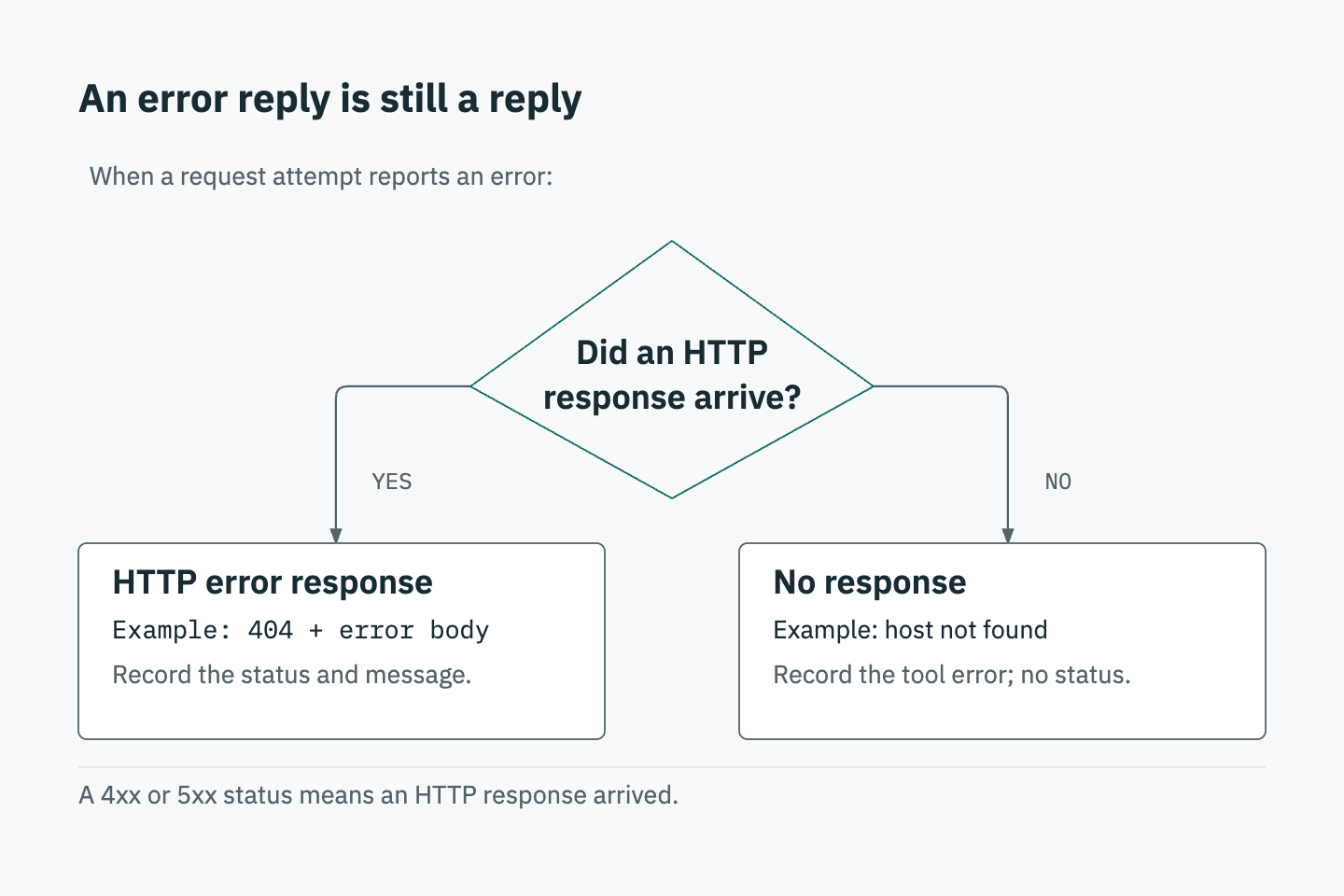
When no response arrives
A request has to travel to the server, and the answer has to travel back. The trip can fail before any answer exists, in three ways:
- The website name in the address may not exist anywhere.
- The name may exist, but the computer behind it may not accept requests.
- The server may take so long to answer that the sender gives up waiting.
In each case, no HTTP response arrives. An HTTP response is the message a server sends back to a request, with a status, headers, and usually a body, like the 404 above. Without a response there is none of those.
When no response comes back, the program that sent the request still shows a message of its own. The two below came from curl. You do not need curl for the assignment; it is here only because it prints real failure messages. In each block, the first line is the request that was tried and the second is what curl printed.
GET https://shop-api.example.invalid/products/1
curl: (6) Could not resolve host: shop-api.example.invalid
“Could not resolve host” means curl could not find any computer with that website name.
Names ending in .invalid are kept unused so that no real website ever has one. That makes it a safe example of a name that cannot be found.
GET http://127.0.0.1:1/products/1
curl: (7) Failed to connect to 127.0.0.1 port 1 after 0 ms: Couldn't connect to server
Here 127.0.0.1 is the address of your own computer. The :1 after it is a port number. A port is a numbered entry point on a computer, and normally nothing on your computer is set up to answer requests at port 1. So the connection fails. The “0 ms” means zero milliseconds, a time measured in thousandths of a second. It only says the failure was immediate.
The numbers 6 and 7 in parentheses are curl’s own codes for its own problems. They are not HTTP statuses. Neither message contains 404, 500, or any status from the server, because the server never got to send one.
What a tester writes down
The two outcomes need different notes. If you mix them up, the next person will check the wrong thing. The table sets them side by side: in the first column the server answered with an error, and in the second nothing came back at all.
| An error response (the server answered) | No response (nothing came back) | |
|---|---|---|
| Example | products/9999 returned 404 | The curl message “Could not resolve host” |
| Status | A number, such as 404 | None, so there is no number to copy |
| Headers | Present | None |
| Body | Usually present, and often says what went wrong | None |
| What you write down | The status number, the error message, and the request that caused it | “No response”, and the message that was shown |
Record each request separately, with its own URL. When a status arrived, copy the number exactly as shown. When none arrived, leave the status empty rather than filling in a number you guess. A no-response result does not prove the server is broken. The website name, your internet connection, or the server could each be the cause, and the message shown is your first clue.
The assignment gives you two real TestKru requests and a written record of a failure to practice on.
Work through the assignment with two requests and a transcript
Continue practicing: Tell an HTTP error from no response
The assignment uses TestKru, the course’s practice API, with TestKru’s users rather than the products above. Open the assignment and choose Sign in to practise, or Create an account first if you need one. This is your CodeKru sign-in, which saves your work.
The assignment page lists five parts. You send and select a known-user response, then an unknown-user response. After that you read a supplied transcript, fill in three answer fields, and submit. Selecting a response with Use this response is what saves the evidence your answers are checked against.
Send the known user
- Set Method to GET and Request URL to
https://testkru.com/api/users/1. Leave the body empty and click Send request. - Read the status under Response from TestKru, below the button, then the body in Response body. This is the request for a user that exists, so you are looking at the normal case to compare with the next one. The status should be 200.
- Click Use this response so it is selected for GET /users/1.
Send the unknown user
- Change Request URL to
https://testkru.com/api/users/99, keeping GET and the empty body. Click Send request. - User 99 does not exist, so an error status is the expected result here. It does not mean you typed something wrong. Leave this result on the screen, then read the status number under Response from TestKru and the message in the body, the same way you read products/9999 above.
- Click Use this response so this one is selected for GET /users/99.
Keep the two responses apart. The status you will enter later must come from the one selected for the unknown user, not from the known user’s response.
Read the transcript
The page includes a supplied transcript under Supplied training evidence / contract, where it is called a controlled failure transcript. A transcript is a written record of what was reported, here for a request to https://testkru.com/api/users/1 that failed. It is supplied so you can study a failure without causing one, so do not try to reproduce it on your own network.
Read it line by line and ask the question from this lesson: did any HTTP response arrive? Look in the transcript for a status, response headers, and a response body. Write down only what it actually shows, and use the table in the section on what a tester writes down to decide what that means. Do not write down a status the transcript does not show.
Enter the three answers
Go to the Submit answers part of the page. The three fields ask for different evidence:
| Answer field | Where to look |
|---|---|
| Unknown-user status | The status of the response you selected for GET /users/99 |
| Classify the 404 | The same selected response: ask whether a response arrived and what it contained |
| Classify the connection transcript | The transcript: ask whether it contains a status at all |
For the status field, copy only the number, without quotation marks. The two classification fields are multiple choice. Each option is a statement about what happened, so pick the one your response or transcript supports. Use the table in the section on what a tester writes down. When a response arrives, it has a status, headers, and usually a body. When no response arrives, none of those exist.
Submit and correct any mismatch
Click the Submit Answers button. The assignment page says a saved 100/100 means every check passed, and Continue opens the next lesson’s assignment.
If a check needs attention, read its note and compare it with the response or transcript it names. A status mismatch usually means a typo, extra quotation marks, or a number taken from the wrong response. A classification mismatch means the option does not match the evidence, so go back to the question of whether a response arrived. If you did not select a response for one of the two requests, send it and click Use this response for it.
Occasionally one of your own requests may return no response, for example if your connection drops. Read the error message, then send the request again. Do not enter a status for a request that returned no response.
Check your reasoning with the 500 question
Under Self-review and independent variation, the assignment asks: if an API returns 500, can its server have responded? There is no answer box for it.
Ask yourself two questions. First, where does a status code such as 500 appear? Second, what does a 5xx status say about whether a response came back? Then write your own explanation in two or three sentences.
The next lesson shows how to build a URL, including search words with spaces, so the server understands what you are asking for.