
Welcome back
In the previous article, you learned what Selenium is and what it can automate. This lesson maps the toolkit you will meet in docs, jobs, and interviews.
Think of that first article as meeting a car. This article is learning the key parts: steering, a recorder, a multi-lane highway, and the helper that makes sure the right key is ready.
Official Selenium documentation treats Selenium as an umbrella project: tools and libraries for browser automation, not a single program. Beginners meet these pieces most often:
| Piece | Plain-English job |
|---|---|
| WebDriver | The programming API that controls a browser from code |
| IDE | A browser extension that records and plays back actions |
| Grid | Runs WebDriver sessions on remote machines, often in parallel |
| Selenium Manager | Built-in helper that can manage matching browser drivers |
This academy focuses on WebDriver with Java. The other pieces still matter for real projects and interviews.
One analogy for the whole ecosystem
Imagine a restaurant:
- WebDriver is the chef following a written recipe (your Java test).
- IDE is a camera that records one cook preparing a dish so you can replay the steps.
- Grid is many kitchen stations, so several dishes can cook at once.
- Selenium Manager makes sure the right tools are on the counter before cooking starts.
As a beginner, you mainly need WebDriver and Selenium Manager. Use IDE for exploration. Use Grid later for scale.
The big picture
Before we open each tool, keep this simple map:
- WebDriver writes the browser instructions in code
- Selenium Manager helps prepare the matching driver before a session starts
- IDE can record those actions instead of writing them first
- Grid can distribute the same WebDriver instructions to remote machines
The next section shows how a Selenium 4 command actually travels from your Java code to the browser.
How Selenium 4 works under the hood
Understanding the request path makes the rest of the ecosystem click. Official Selenium documentation describes WebDriver communication as two-way: your code sends commands to the browser through a driver, and information comes back the same way.
The pieces on the path
Official Selenium docs separate a few terms that beginners often mix up:
| Piece | Role |
|---|---|
| API | The commands you call, such as open a URL, find an element, or click |
| Client library (language bindings) | The Java jar (or Python/C# package) that implements those commands in your language |
| W3C WebDriver protocol | The shared HTTP + JSON language used to send those commands |
| Browser driver | A browser-specific program such as ChromeDriver or GeckoDriver |
| Browser | Chrome, Firefox, Edge, Safari, and so on |
| Test framework | Something like TestNG that runs tests and checks pass/fail. WebDriver itself does not assert or report |
Most browser drivers are created by the browser vendors. The driver usually runs on the same machine as the browser. People sometimes call the driver a proxy, because it sits between your test and the browser.
What happens when a session starts
Before normal commands can run, Selenium creates a session.
In a local Java test, new ChromeDriver() typically means:
- Selenium Manager may resolve a compatible ChromeDriver if needed.
- ChromeDriver starts and listens for WebDriver HTTP requests (often on a local port).
- Your Java client asks the driver to create a new session with Chrome.
- The driver launches Chrome and returns a session id.
- Later commands include that session id so the driver knows which browser window to control.
Calling quit() ends the session and closes the browser.
Local request flow (what you use first)
After the session exists, a normal command travels like this:
Your Java test
   (client library / language bindings)
        │
        │  HTTP request (W3C WebDriver protocol)
        ▼
Browser driver
   (ChromeDriver, GeckoDriver, ...)
        │
        │  native browser automation
        ▼
Real browser
        │
        ▼
HTTP response travels back to your Java test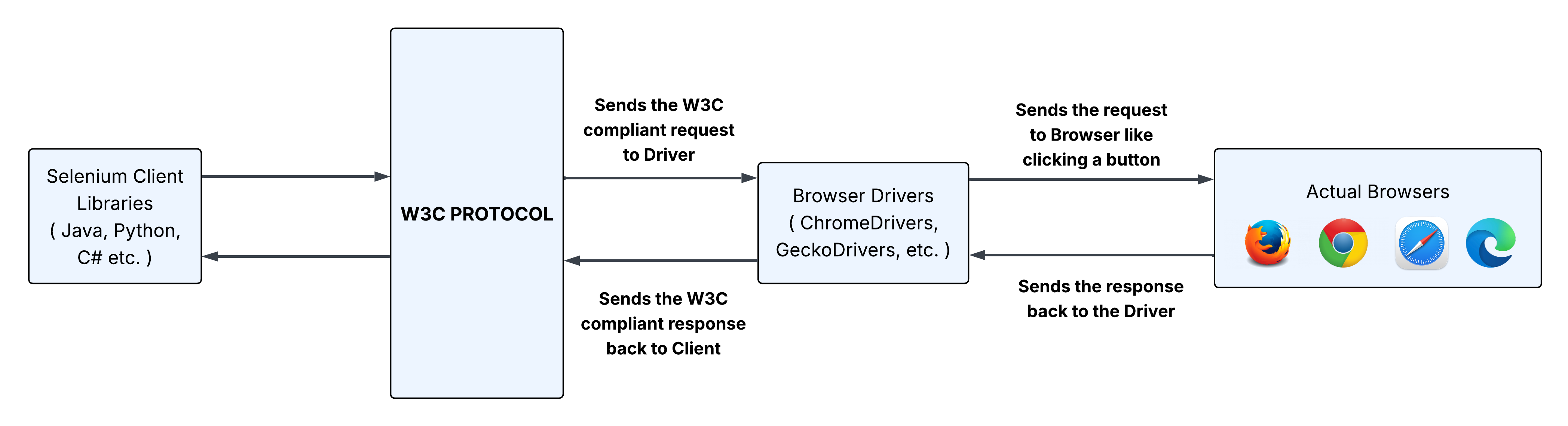
Example: you call driver.get("https://testkru.com/Elements/TextFields").
- The Java client library turns that call into a WebDriver command.
- The command is sent as an HTTP request using the W3C WebDriver protocol to the local driver.
- The matching browser driver receives the request for the active session.
- The driver tells the real browser to open the URL.
- The driver sends a response back to your Java code (success or error).
The same path is used for actions such as find element, click, type, and get title. Your Java line looks simple. Underneath, it is still a request/response conversation with the driver.
Selenium Manager fits in before the session starts: it helps make sure a compatible browser driver is available. After the session begins, day-to-day commands follow the path above.
Why Selenium 4 uses the W3C protocol
Older Selenium setups commonly relied on the legacy JSON Wire Protocol. Selenium 4 is built around the W3C WebDriver standard, so major browsers share one common automation language. That shared protocol is a big reason Selenium commands can look similar across Chrome, Firefox, and Edge.
You do not need to memorize HTTP endpoints as a beginner. Just remember:
Your Java method call becomes a standard WebDriver request, a browser driver receives it, the browser performs the action, and a response comes back.
Local vs remote path
- Local: Java client talks directly to the browser driver on your machine.
- Remote (Grid): Java client talks to Selenium Grid first. Grid chooses a node. That node’s browser driver talks to the browser.
Same idea either way: client library → WebDriver protocol → driver → browser.
Where TestNG fits
WebDriver’s job is browser control. It does not know about pass/fail, reports, or test annotations.
That is why this academy uses TestNG with Selenium:
- WebDriver opens the browser and performs actions
- TestNG runs the test methods and checks assertions such as
Assert.assertTrue(...)
Keep those roles separate in your mind. It will help when you build larger frameworks later.
Selenium WebDriver
What WebDriver is
WebDriver is the main way teams automate browsers today. Official docs say it drives a browser natively, as a user would, locally or remotely. “WebDriver” usually means both:
- The language bindings (the Java APIs you write against)
- The browser-controlling implementations behind them
Real-life analogy
Think of WebDriver as a remote control for real browser actions: open a page, click, type, read text, switch tabs. Your Java code presses those buttons. The browser responds as if a person did the work.
Why it matters in this course
Almost every later lesson builds on WebDriver: finding elements, clicking and typing, waits, alerts and frames, Page Objects, and CI runs. When people say “learn Selenium with Java,” they usually mean WebDriver with Java.
WebDriver and the W3C standard
As covered in the request-flow section above, WebDriver follows the W3C WebDriver Recommendation (Level 1, published 5 June 2018). Selenium 4 uses that protocol so major browsers share a common automation language.
Sessions and languages
A WebDriver session is the active connection to one browser instance, created when the driver starts and ended with quit(). Official language bindings include Java, Python, C#/.NET, JavaScript, Ruby, and Kotlin (via Java bindings). This course uses Java. The concepts transfer across languages even when syntax changes.
Selenium IDE
What Selenium IDE is
Selenium IDE is a browser extension that records your actions and can play them back. Official docs describe it as an easy way to develop Selenium test cases. It is available for Google Chrome, Mozilla Firefox, and Microsoft Edge. Instead of saving a video, it saves steps such as open URL, click, type, and check a message.
When IDE helps
IDE is useful when you want to:
- Explore a flow quickly without writing Java first
- Learn how Selenium commands map to user actions
- Prototype a short smoke check
- Show a teammate how to reproduce a bug
When IDE is not enough
IDE alone is usually not enough for a long-term Java framework when you need reusable page classes, richer assertions, large suite structure, and deep Maven/TestNG design. That is why this academy teaches WebDriver with Java as the main path.
Beginner tip: when locators feel confusing later, record one click in IDE, inspect the locator it chose, then rewrite a cleaner locator in Java. Use IDE as a teacher, not as your final architecture.
Selenium Grid
What Grid is
Selenium Grid lets WebDriver scripts run on remote machines by routing commands to remote browser instances. Official goals include parallel runs, different browser versions, and cross-platform testing.
Your laptop is one kitchen. Grid is a catering warehouse with many kitchens. You still write one recipe (your WebDriver test). Grid decides which kitchen cooks it: Windows + Chrome, Linux + Firefox, and so on.
When Grid becomes useful
You usually do not need Grid on day one. It becomes useful when:
- Your suite is large and local runs take too long
- You must cover multiple browsers or operating systems
- CI needs parallel browser capacity
- Browsers must run on machines you do not control directly
Deployment styles beginners should know
Selenium Grid 4 can run as:
| Mode | Beginner meaning |
|---|---|
| Standalone | Everything in one process. Easiest local start. |
| Hub and Node | One entry point, one or more worker machines. Common team setup. |
| Distributed | Separate services for larger deployments. |
By default, a local standalone Grid listens at http://localhost:4444. Official docs also warn that a Grid must be protected from external access. An open Grid can expose infrastructure and internal apps, so treat it like any server.
In this academy, early modules run locally. Module 9 returns to remote execution and Grid in more depth. For now, treat Grid as the scale layer, not your first coding step.
Selenium Manager
What Selenium Manager is
Selenium Manager is Selenium’s official driver (and, in newer versions, browser) management tool. Official docs describe it as a Rust CLI shipped with Selenium bindings. Most users never call it directly.
It has shipped since Selenium 4.6. Docs still label it Beta, even though it is the built-in path for many setups.
Why it exists
Browsers update often, and drivers must stay compatible. If Chrome updates while an old chromedriver stays behind, sessions can fail with version mismatch errors. Community driver managers existed for years because this pain was common. Selenium Manager brought official management into Selenium itself.
How it behaves
In practice:
- If a suitable driver is already on your
PATH, Selenium can use that. - If no driver is provided, Selenium Manager can act as a fallback: discover the browser version, resolve a matching driver, download it, and cache it.
- From Selenium 4.11.0 onward, it also supports automated browser management for supported browsers in additional scenarios, with more browser support added in later 4.x releases.
By default, assets are cached under a local Selenium cache folder (commonly ~/.cache/selenium on macOS/Linux). You usually do not manage that folder by hand while learning.
Practical takeaway:
In modern Selenium 4 Java projects, you often start with
new ChromeDriver()and do not begin with a manualSystem.setProperty("webdriver.chrome.driver", "...").
Which tool do you need?
| Need | Best fit | Why |
|---|---|---|
| Maintainable Java tests | WebDriver | Core automation API |
| Quick recorded flow | IDE | Fast feedback and learning |
| Many browsers or machines in parallel | Grid | Remote distribution and scale |
| Less manual driver setup | Selenium Manager | Built-in driver management |
| This academy’s default path | WebDriver + Manager first | Setup comes next |
Selenium RC (legacy only)
Older articles list IDE, RC, WebDriver, and Grid. Selenium RC was an earlier architecture and is legacy. Official Selenium legacy docs treat it as historical. Selenium 3 moved fully onto WebDriver; Selenium 4 continues on the W3C WebDriver model. Know the name for interviews. Do not build new work on RC.
Mini example: WebDriver + Selenium Manager
This lesson is mostly conceptual, but one small runnable example makes the ecosystem concrete. It shows:
- Your Java test using the WebDriver API
- Chrome starting without a manual driver path
- Selenium Manager resolving the driver when needed
- A real practice page opening on TestKru
Demo URL: https://testkru.com/Elements/TextFields
Expect: page title contains Text Fields
Assume for now: JDK, Maven, Selenium 4, TestNG, and Chrome are available. The next article covers full setup.
Save this as something like src/test/java/academy/SeleniumEcosystemDemoTest.java:
import org.openqa.selenium.WebDriver;
import org.openqa.selenium.chrome.ChromeDriver;
import org.testng.Assert;
import org.testng.annotations.AfterMethod;
import org.testng.annotations.BeforeMethod;
import org.testng.annotations.Test;

public class SeleniumEcosystemDemoTest {

    private WebDriver driver;

    @BeforeMethod
    public void setUp() {
        // Selenium Manager can resolve a compatible ChromeDriver when needed.
        driver = new ChromeDriver();
        driver.manage().window().maximize();
    }

    @Test
    public void openTestKruTextFieldsPage() {
        driver.get("https://testkru.com/Elements/TextFields");
        Assert.assertTrue(
                driver.getTitle().contains("Text Fields"),
                "Expected title to contain 'Text Fields' but was: " + driver.getTitle()
        );
    }

    @AfterMethod
    public void tearDown() {
        if (driver != null) {
            driver.quit();
        }
    }
}
What the code does:
@BeforeMethodstarts Chrome through WebDriver. Selenium Manager can supply the matching driver when needed.- The test opens the TestKru Text Fields page and asserts the title.
@AfterMethodcallsquit()so the session and browser close.
Run it from IntelliJ or Maven once Selenium 4 and TestNG are on the classpath. You should see Chrome open, load the page, pass, then close. Driver discovery errors usually mean setup still needs the next article.
Beginner learning order
- WebDriver + Selenium Manager for local Java tests
- IDE occasionally to explore flows and locators
- Grid / RemoteWebDriver after local tests are stable
Do not jump to Grid and Docker before you can write a reliable local click-and-assert test. Scale comes after stability.
Summary
- Selenium is an ecosystem, not one isolated program.
- In Selenium 4, a command usually travels: Java client library → W3C WebDriver HTTP request → browser driver → real browser, then a response comes back.
- WebDriver is the main API for writing browser automation in Java.
- IDE records and plays back browser actions and helps beginners learn command flow.
- Grid sits in the middle for remote runs: client → Grid → node driver → browser.
- Selenium Manager helps prepare a compatible driver before the session starts.
- Selenium RC is legacy history, not your learning path.
- For this academy: master local WebDriver first. Add IDE as a helper. Save Grid for later scale.
Assignment
Write a short decision note for these four situations. For each one, choose WebDriver, IDE, Grid, Selenium Manager, or a combination, and explain why in one or two sentences.
- You want to practice writing Java assertions against a login page on your laptop.
- A teammate wants a quick recorded demo of a checkout bug without writing code first.
- Your CI job must run the same suite on Chrome and Firefox across multiple machines overnight.
- A classmate’s test fails because Chrome updated and the old chromedriver no longer matches.
Self-check: WebDriver is the main coding tool, IDE is for recording/learning, Grid is for remote/parallel scale, and Selenium Manager helps with driver readiness.
Continue practicing: Your First Selenium Script
What is next
Next article: Set Up Java, IntelliJ, Maven, and Your First Selenium Java Test. You will install Java, create a Maven project, add Selenium and TestNG, and run your first WebDriver test.
FAQ
1. Is Selenium one tool or many?
An umbrella project with multiple tools and libraries. Beginners mainly meet WebDriver, IDE, Grid, and Selenium Manager.
2. How does a Selenium 4 command reach the browser?
Your Java client library sends an HTTP request using the W3C WebDriver protocol to a browser driver. The driver controls the real browser and returns a response.
3. What should beginners learn first?
Start with WebDriver. That is the API for lasting Java automation. Selenium Manager usually helps quietly during setup.
4. Do I need Grid to start?
No. Learn local WebDriver first. Add Grid when you need remote browsers, parallel capacity, or multi-environment coverage.
5. Is IDE enough for a full Java career path?
IDE is excellent for recording, learning, and quick prototypes. Long-term Java frameworks usually need WebDriver code and maintainable project structure.
6. What is Selenium Manager?
Selenium’s official helper that can discover, download, and cache compatible browser drivers when they are not already available.
7. Is Selenium Manager still Beta?
Yes. Official docs still label it Beta, even though it ships with Selenium and is used by default in common setups since 4.6.
8. What happened to Selenium RC?
RC is legacy. Modern Selenium is built around WebDriver. Know the name for interviews, but do not learn RC for new projects.
9. Can WebDriver and Grid work together?
Yes. Your test still uses WebDriver APIs, but you point a RemoteWebDriver session to Grid so execution happens on a remote node.